Every screen, on one real job.
Built by people who ran the trade, not adapted from a generic field-service template. Below is the whole product, screen by screen — real screenshots of the running app, not illustrations, not a render, not one heroic dashboard reused nineteen times. Judge it on what you can see.
Every image on this page came off a live install running a bank branch security rollout — the drawing, the counts, the estimate, the signed proposal, the job, the purchase order and the project budget are all the same job, followed all the way down.
A card reader counted off a floor plan is the same row that prices the estimate, appears on the signed proposal, becomes a device to commission on the job, lands on the purchase order raised to the vendor, and gets billed. Nothing is retyped anywhere along this line — which is the whole reason a number on the invoice can still be traced back to the symbol on the drawing.
- Lead
- Estimate
- Takeoff
- Proposal
- Job
- Purchase order
- Project budget
- Invoice
It starts on the drawing
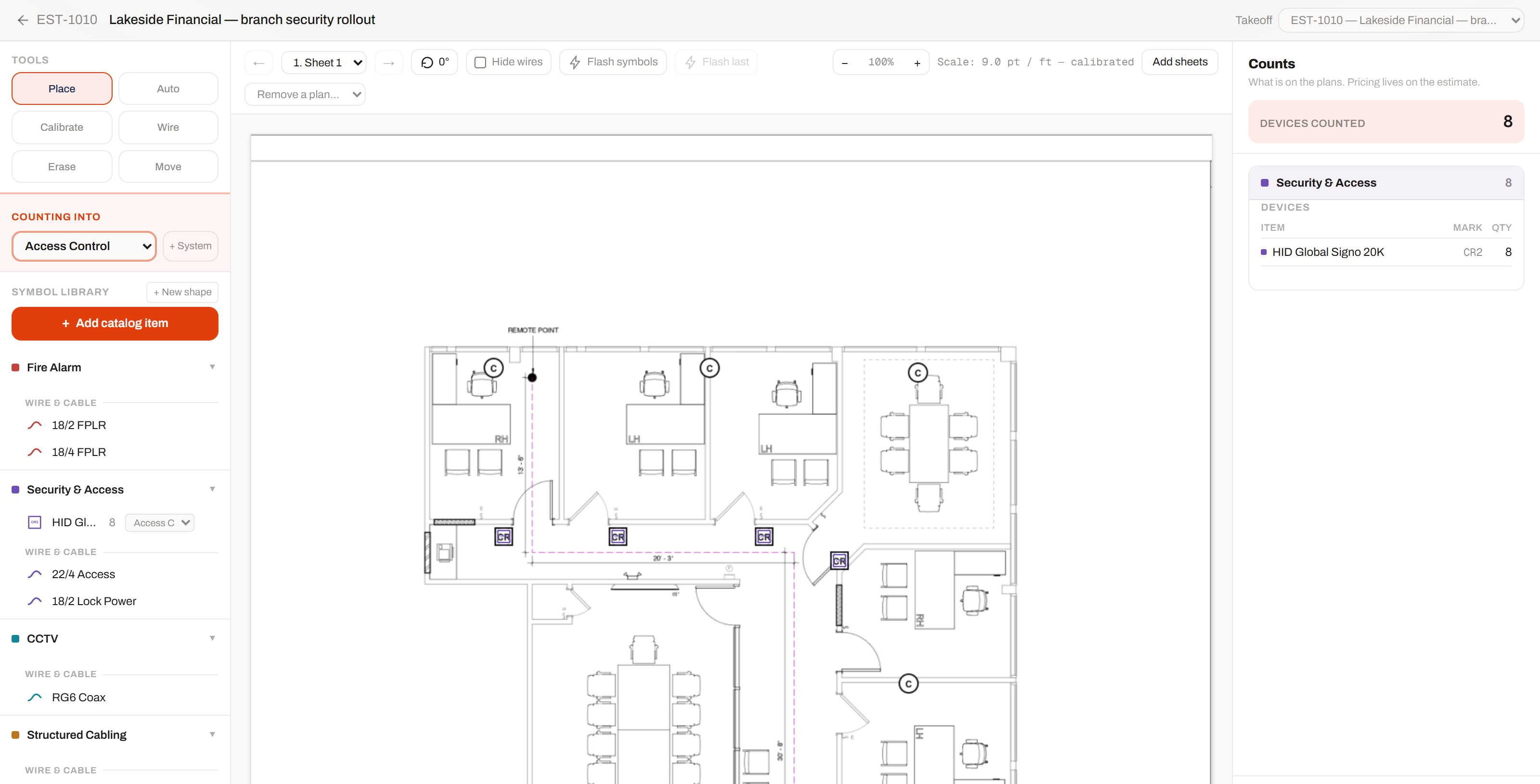
Every estimate in this trade starts with somebody counting symbols on a plan set. Most software ignores that entirely and starts at the spreadsheet. This one starts where the work does — and the count you take is the count that prices the job.
Count the plan. The estimate builds itself.
Load the PDF, calibrate against a dimension you can read off the sheet, and click devices onto it. Each one lands in the system and the location you chose, priced from your catalog the moment it is placed.
- ✓Symbols come from your own catalog — you count the part you actually sell, not a generic dot
- ✓Grouped by system on the right, with a live device count you can hand to a customer
- ✓Draw cable runs on the plan and get measured lengths off the calibrated scale
- ✓Multi-sheet plan sets, rotation, and a wire-hiding toggle for a drawing that's gone busy
- ✓Export marked-up plans with a numbered schedule, or push the counts to CSV
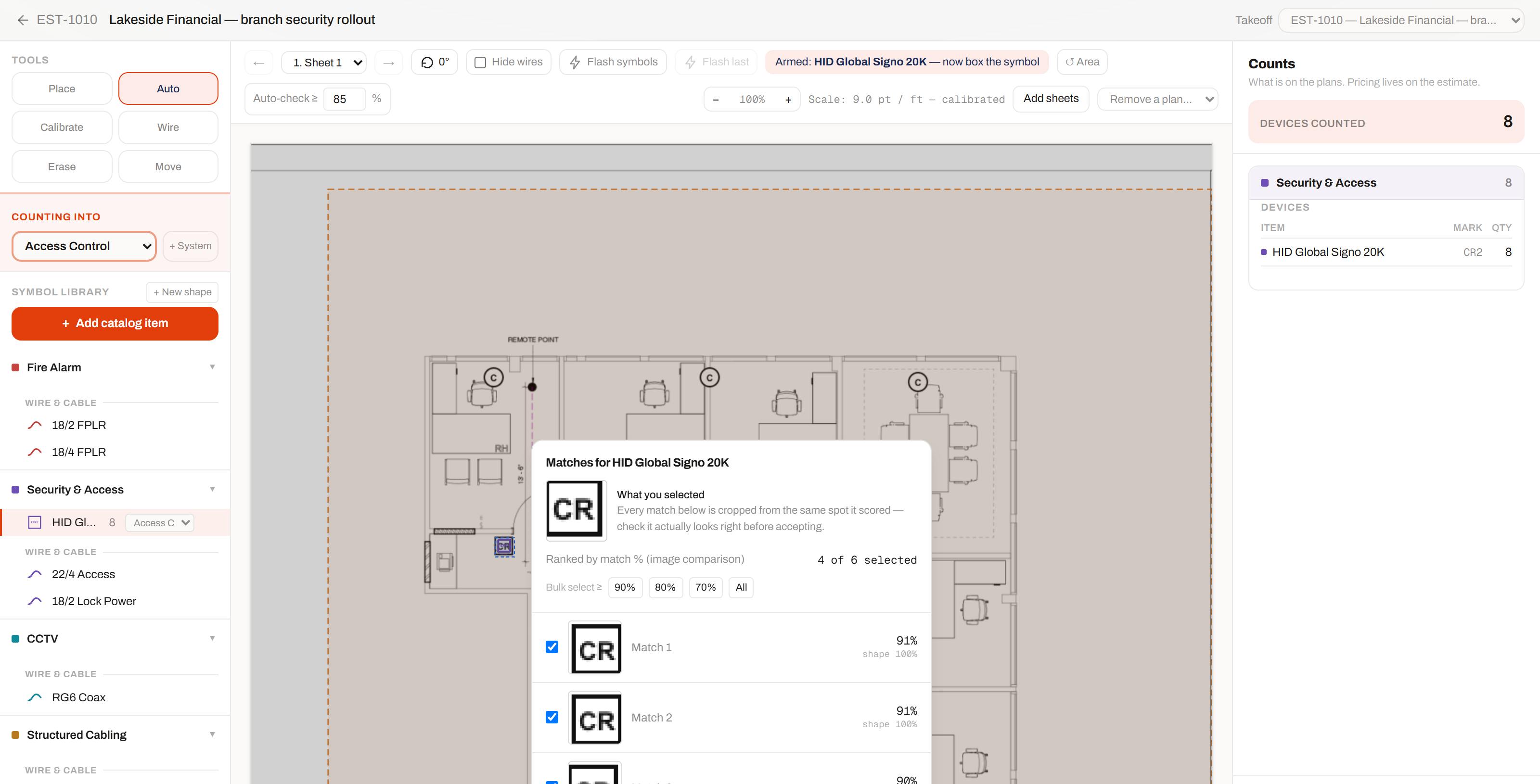
Box one symbol. It finds the rest.
Drag a box around a single card reader and LVOperator searches the sheet for every other instance of it — returning each candidate as the actual crop it found, with the score it earned, for you to approve or reject before a single count is made.
- ✓You see the cropped image behind every match — not a number asking to be trusted
- ✓A confidence threshold you set, so near-misses get offered instead of silently counted
- ✓Nothing is ever counted without a human pressing Accept
- ✓Search a region rather than the whole sheet, when only part of the floor is in scope
- ✓The matches you reject stay rejected — it doesn't re-offer them on the next pass
Sell it
From the first phone call to a signature on a phone, as one record. The estimate stays editable until the proposal is sent — and stays editable after you withdraw it, which is the part every other system gets wrong.
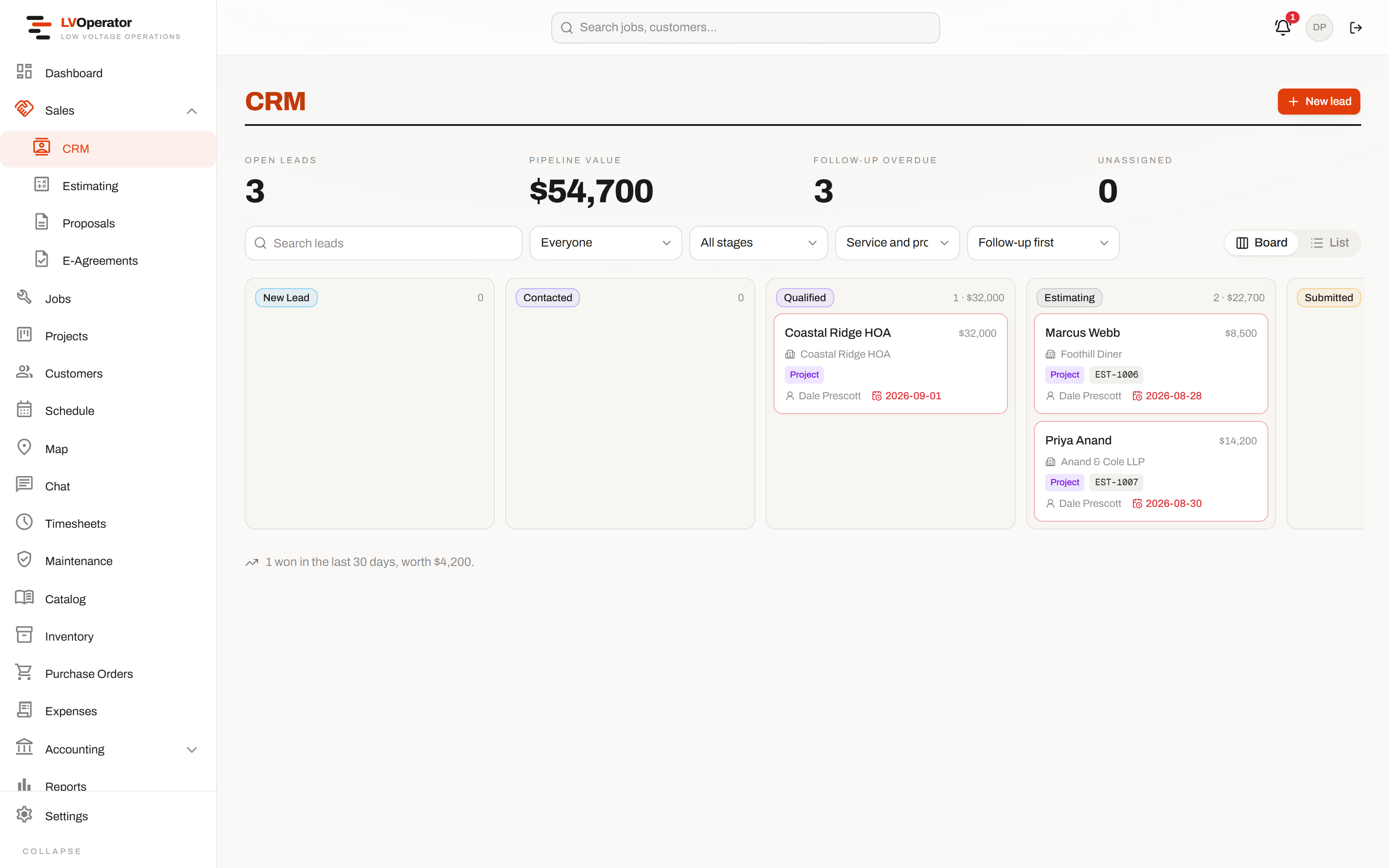
One pipeline, however the lead showed up.
A call, a form on your own website, or a deficiency raised from a job three counties away — all on the same board, so nothing worth following up on is sitting in somebody's inbox instead.
- ✓Board or list, same leads, and the view you chose lives in the URL
- ✓Every opportunity carries an owner and a next follow-up date
- ✓Create the customer's site while you enter the lead, so scheduling never dead-ends later
- ✓Convert to a customer in one step, or win it against an account you already have
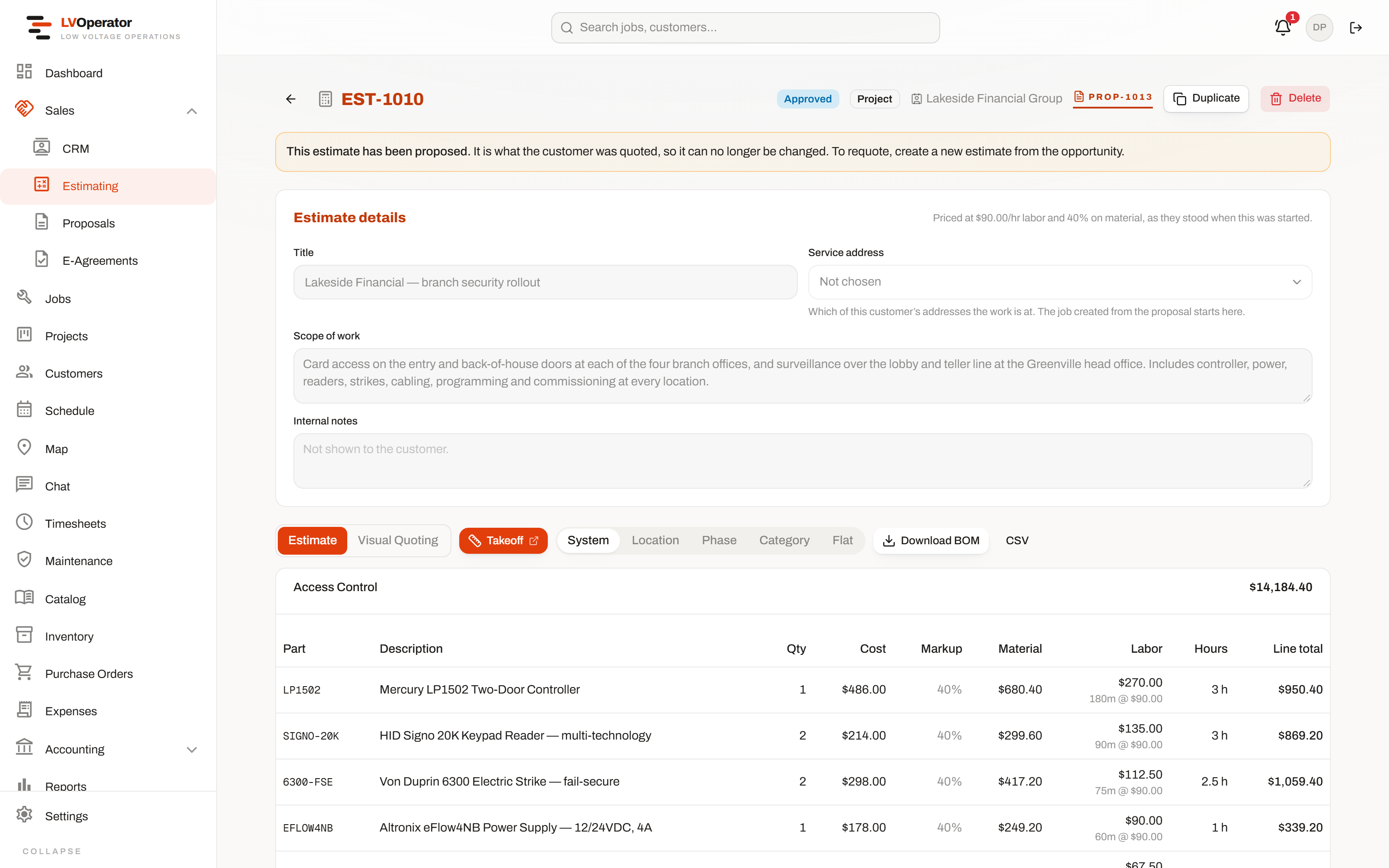
Price it once, and get it right.
Parts, labor and rate cards you already loaded do the pricing — at your service rate or your project rate, with tax, shipping and permits applied without anybody doing the math by hand.
- ✓Take a whole system to a location and multiply it — four identical branches, entered once
- ✓Alternates the customer picks between on the proposal, so there's no second quote to build
- ✓Tax on material, shipping on material, permits on both — your defaults, overridable per estimate
- ✓Regroup the same lines by system, location, phase or category whenever you need a different answer
- ✓Bill of materials out to Excel, subtotaled and grouped the way you grouped the sheet
Signed on their phone, not chased by email.
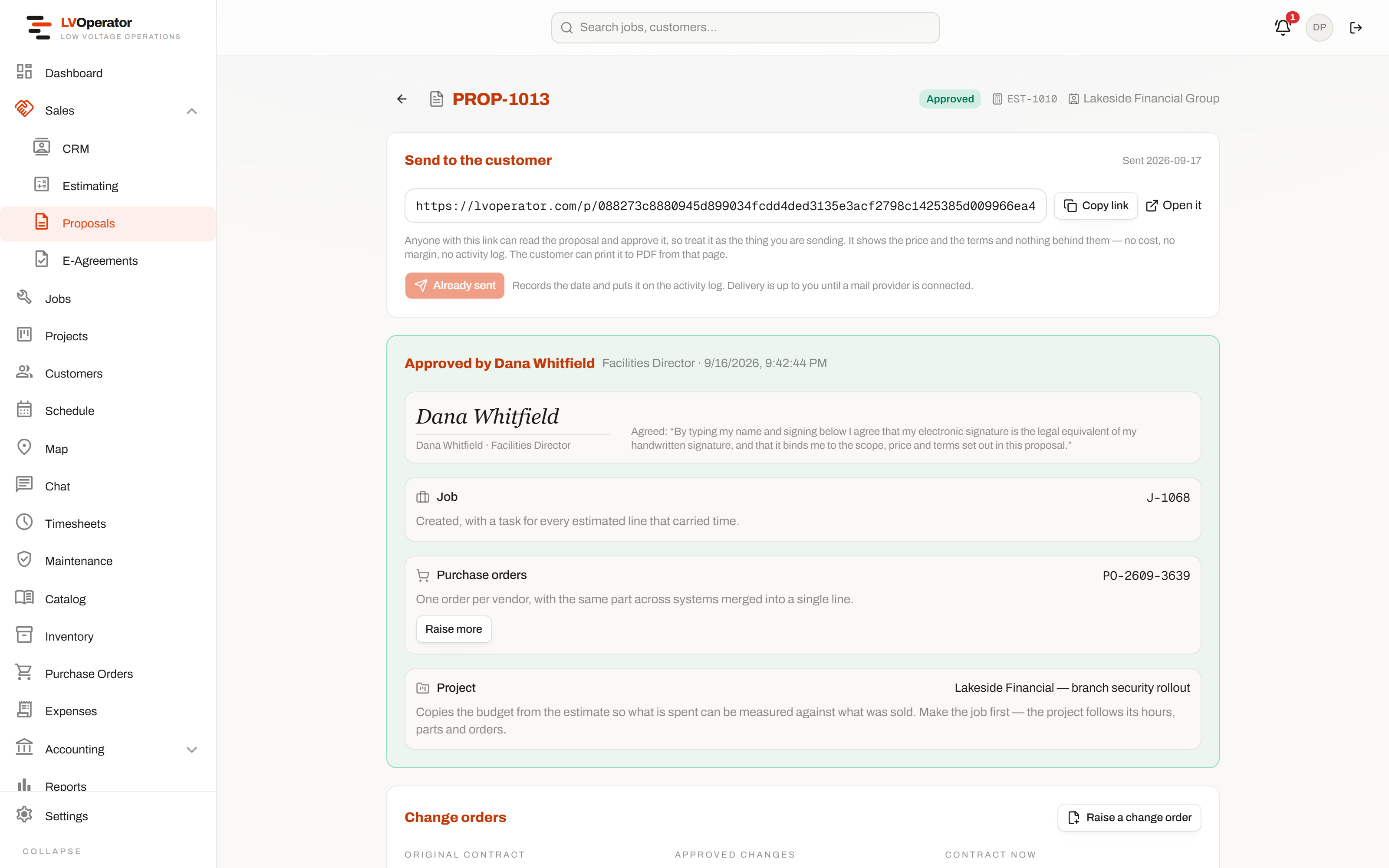
The proposal a customer signs is the same document the estimate was built from — never a PDF exported once and left behind while the real numbers moved on without it.
- ✓Signature drawn or typed on the customer's own phone, timestamped server-side
- ✓You see when it was opened, not just when it was sent
- ✓Withdraw it, fix the estimate, send the same proposal back out — the link and the history survive
- ✓Approval raises the deposit invoice, the job, the project and the purchase orders
- ✓Change orders numbered off the contract they revise, itemized with the reason
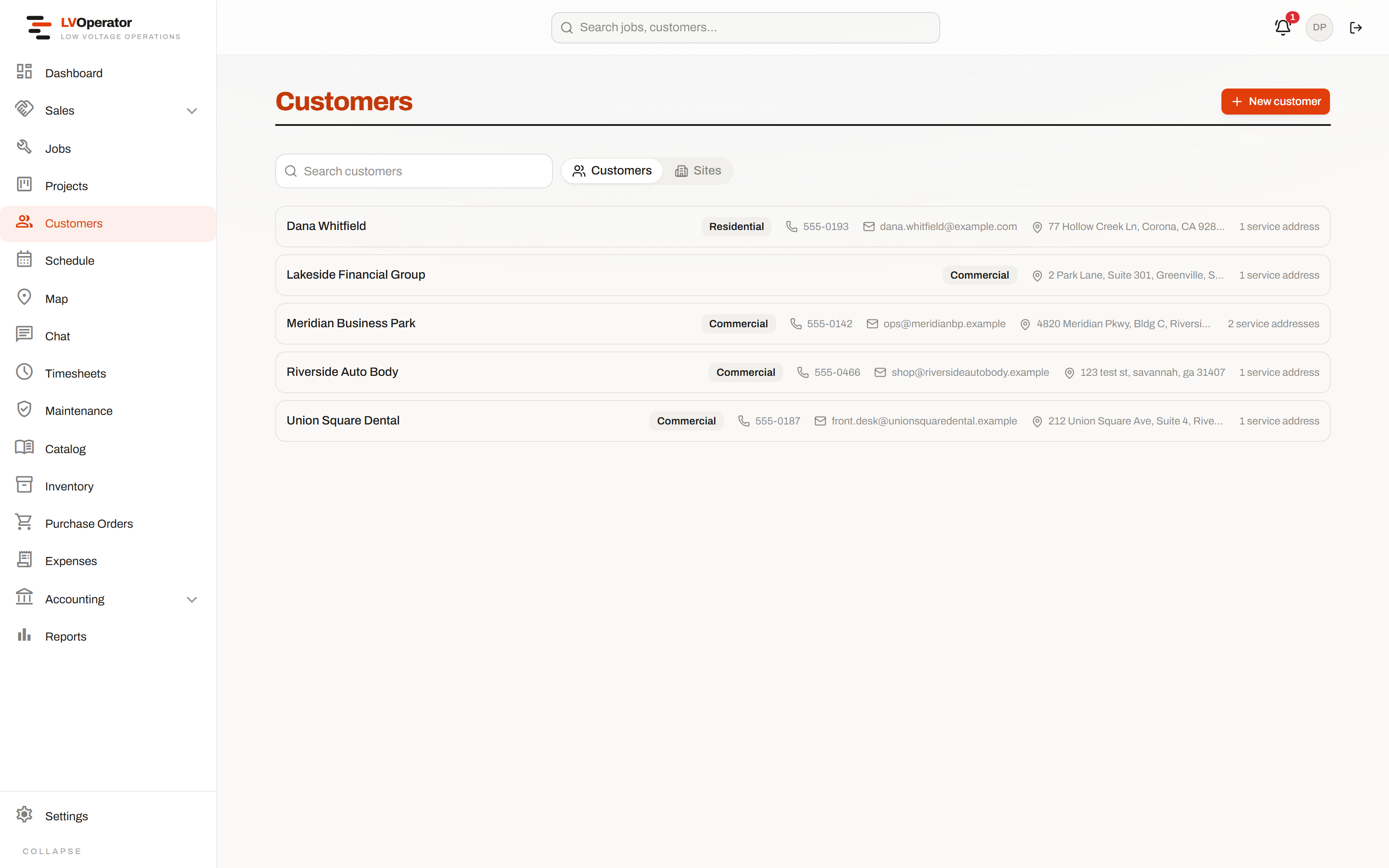
Every site, and everything that ever happened on it.
Accounts hold sites, sites hold contacts, equipment, warranties and history. A tech standing at a panel can see what was installed there in 2019 and who signed for it.
- ✓Per-site contacts and per-site equipment registers, with warranty dates
- ✓Jobs, invoices, documents and messages merged into one activity feed
- ✓Custom fields you define, with an office-only flag for the ones the field shouldn't see
- ✓Portal invitations by link, so you don't need an email provider wired up to use it
Run it
The job that comes out of an approved proposal already knows what was sold, what has to be installed, and what has to be commissioned before anybody can call it finished.
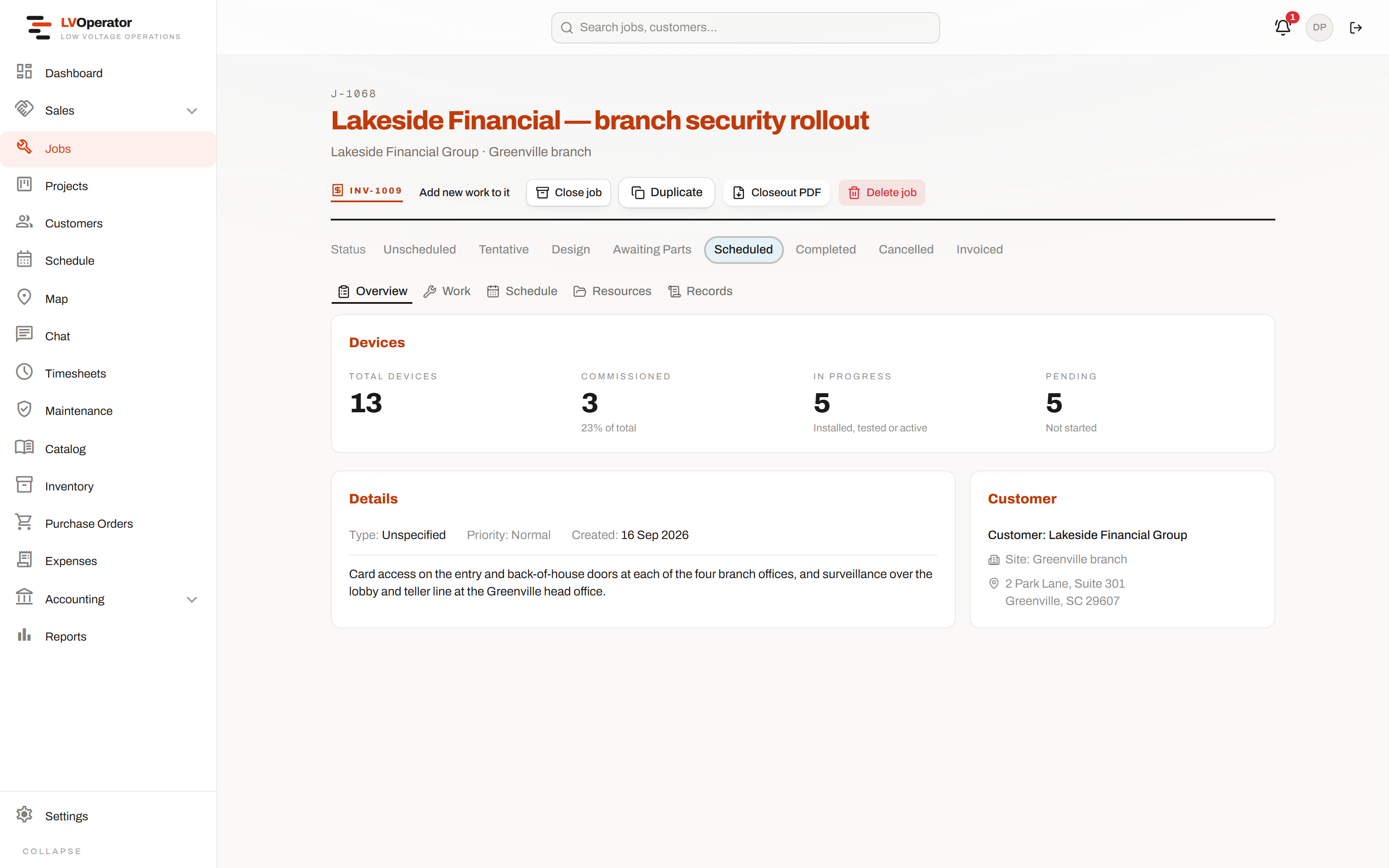
A job that knows what it was sold as.
Scope, site, customer, status and the device rollup, on one screen. The status track across the top is the real lifecycle — unscheduled through to invoiced — not a free-text field somebody has to remember to update.
- ✓Overview, work, schedule, resources and records, as tabs on one record
- ✓Devices rolled up four ways: total, commissioned, in progress, not started
- ✓Closeout PDF generated from what was actually installed, not from what was quoted
- ✓Duplicate a job, or invoice it, without leaving the page
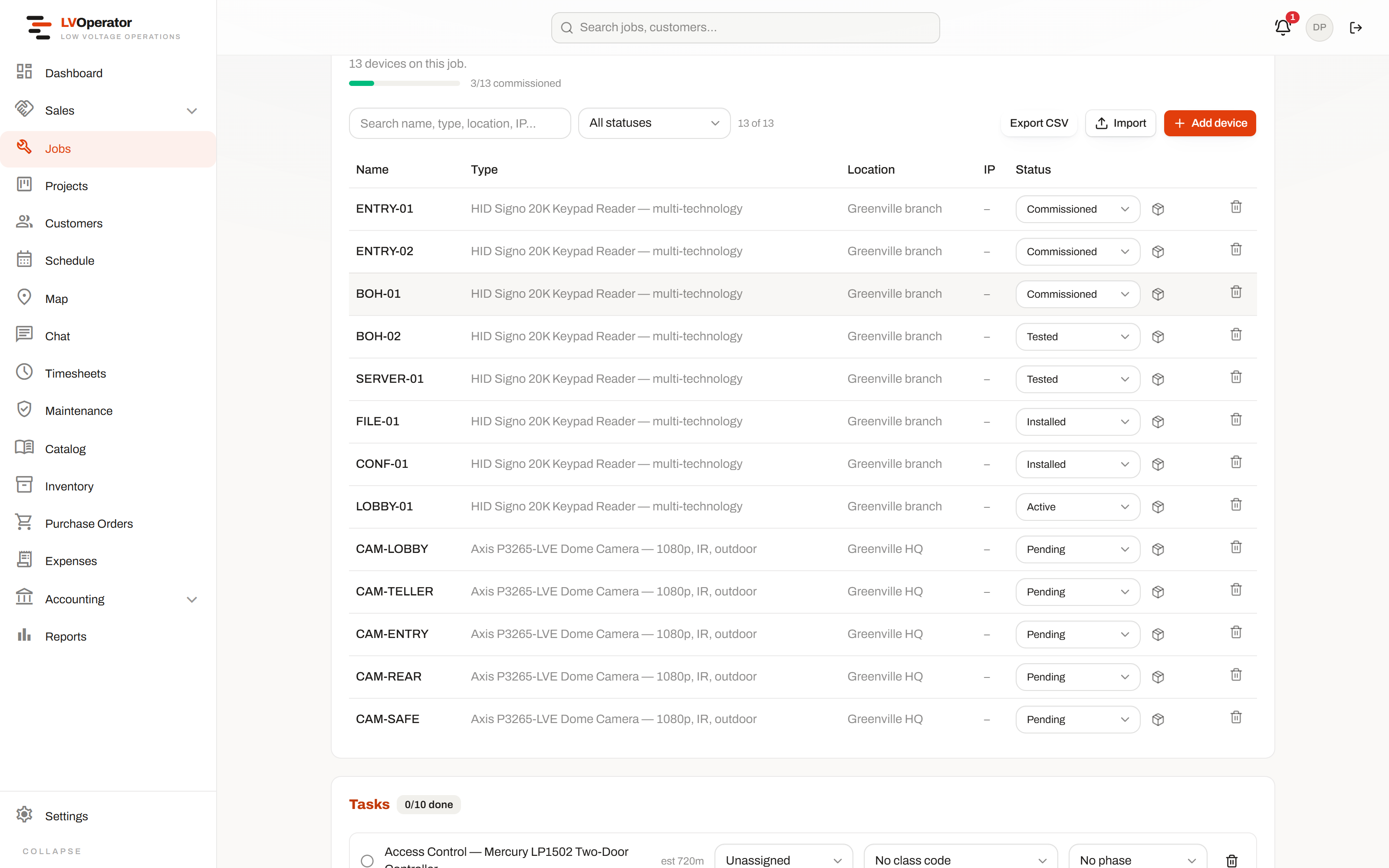
“Is it finished?” has an actual answer.
Every device going in is a row with a state: pending, installed, tested, active, commissioned. The percentage at the top is the one number a customer asks for, and it is computed from the register rather than from somebody's impression.
- ✓Statuses set on the device, from the office or from the technician's phone
- ✓Required photos per category, enforced before a job is allowed to close
- ✓Procurement state and tracking number per device, carrier detected from the number
- ✓Commissioning tasks generated from the catalog items that were sold
- ✓Import and export the register, so a big install doesn't start with typing
Everything open, and what it's waiting on.
Not a wall of rows to scroll. Filter by status, customer, technician or date, and the filter lives in the URL — so the view you actually work from is one you can bookmark, or send to somebody else.
- ✓Sort and filter that survive a refresh and travel in a link
- ✓Device progress shown per job, not just a status word
- ✓Recurring jobs regenerate on their schedule, each one a real record of its own
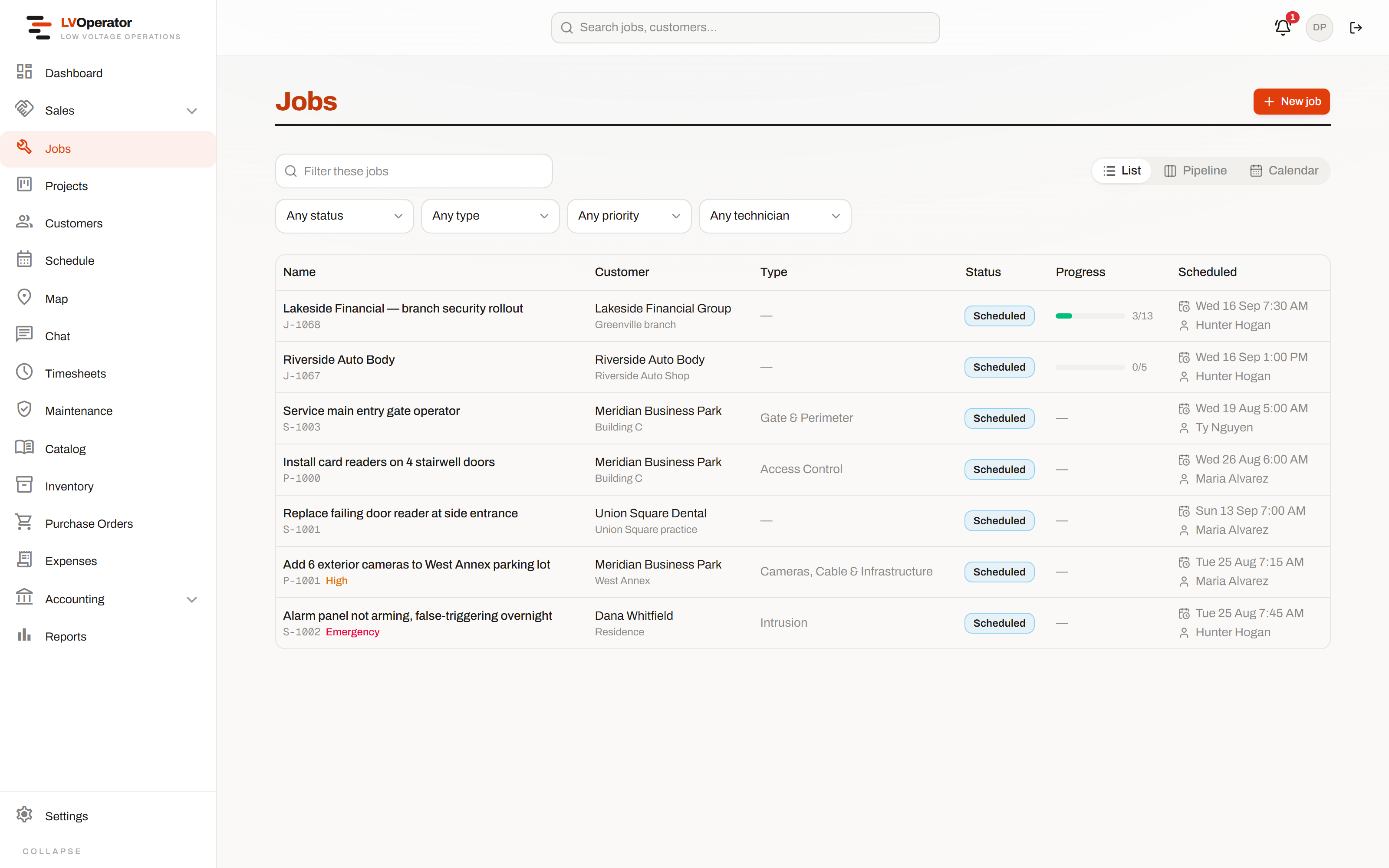
A board that argues with you before the double-booking happens.
Drag a visit onto a technician and it warns you when they're already somewhere else, rather than accepting it quietly and letting you find out on the day.
- ✓Day, week and month views over the same visits
- ✓Time clock with a GPS fix on every punch, and a separate travel clock where it applies
- ✓A live map of every technician and warehouse, with GPS staleness shown honestly
- ✓Portal bookings from customers land straight on the board
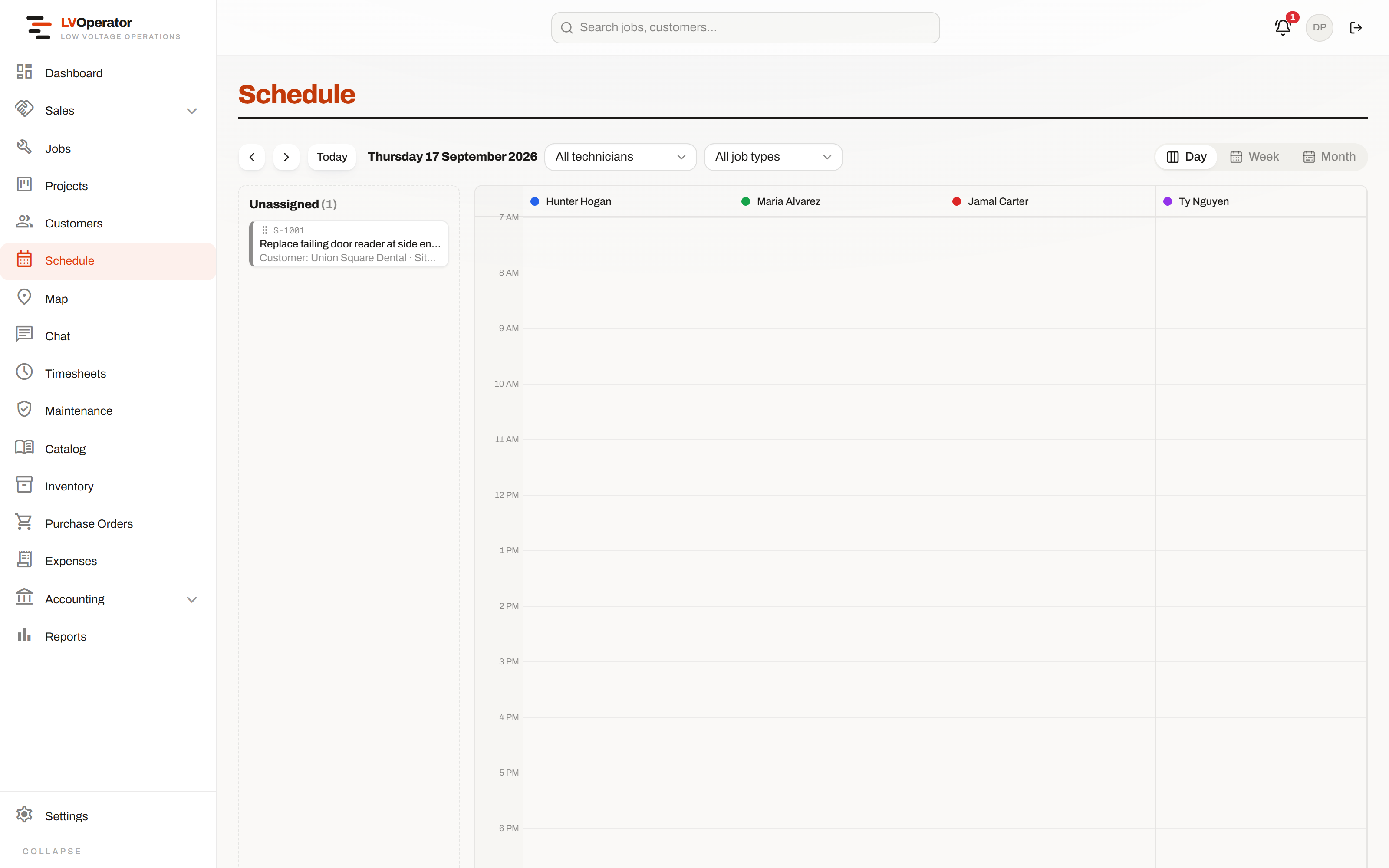
Recurring work that tracks its own entitlement.
A plan is block hours, included visits, or a parts budget — and usage is drawn down against it live, so nobody discovers at renewal that they gave away forty hours.
- ✓Visits generated on a schedule, or forced on demand when a customer calls
- ✓Usage against the entitlement visible while the work is happening, not after
- ✓Started from a proposal, an e-agreement, or set up directly on a site
Buy it
Purchasing is where margin quietly disappears in this trade. Every purchase order here is tied to the job or project it belongs to, routed to a named human, and logged from the moment it was raised.
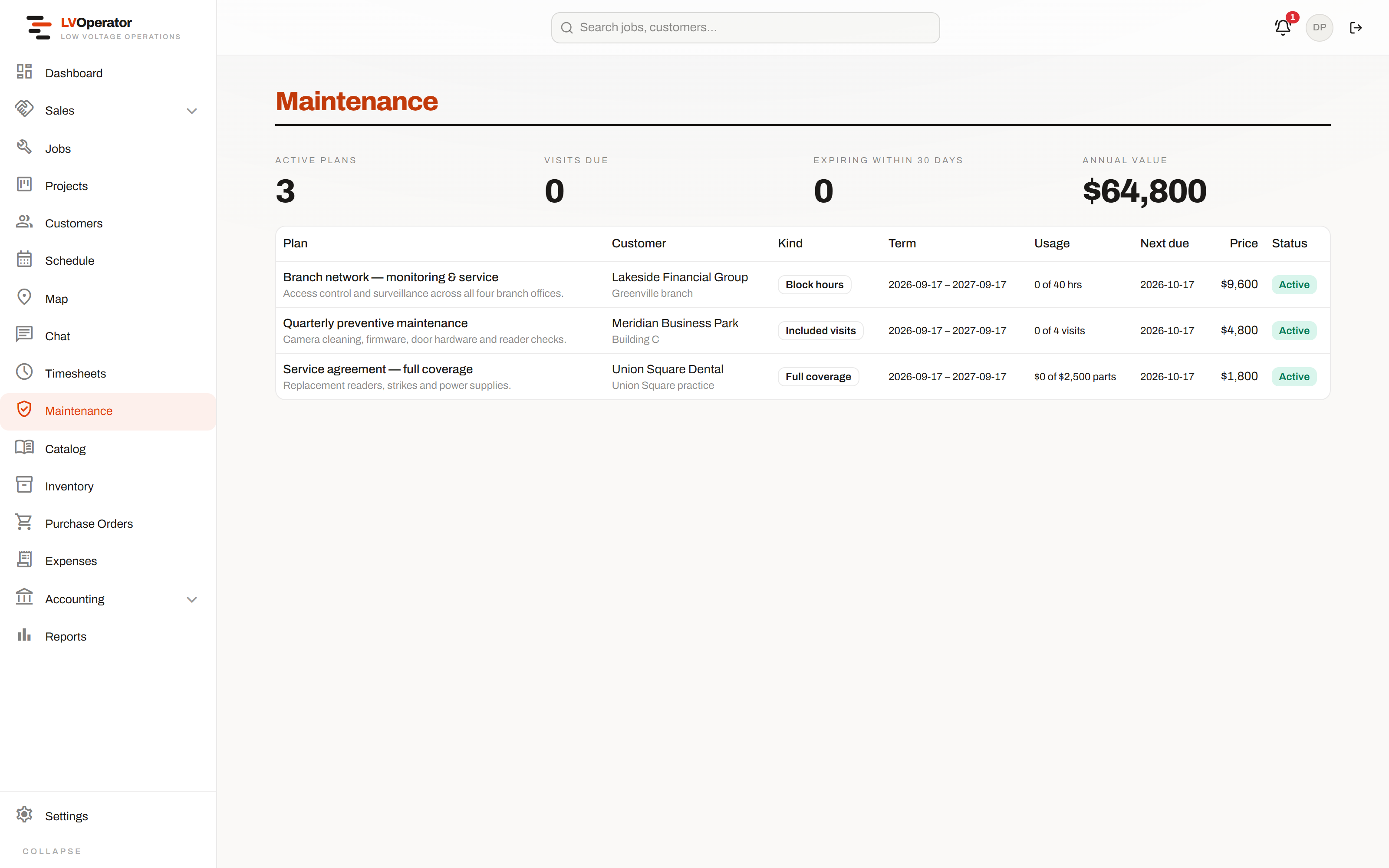
Approved by a person, attached to a job.
Raise it from an approved proposal and it arrives merged one line per vendor. Route it to the people who should approve it and they get notified. Nothing is ever raised blind — you pick the parts that go on it.
- ✓Choose whether one approval is enough or every approver has to sign off
- ✓Attached to a job or a project, or marked overhead when it belongs to neither
- ✓Tracking numbers per shipment, with the carrier recognized from the number itself
- ✓An activity log at the foot of the PO — raised, routed, approved, ordered, received
- ✓Cost columns simply absent for a role that isn't allowed to see them
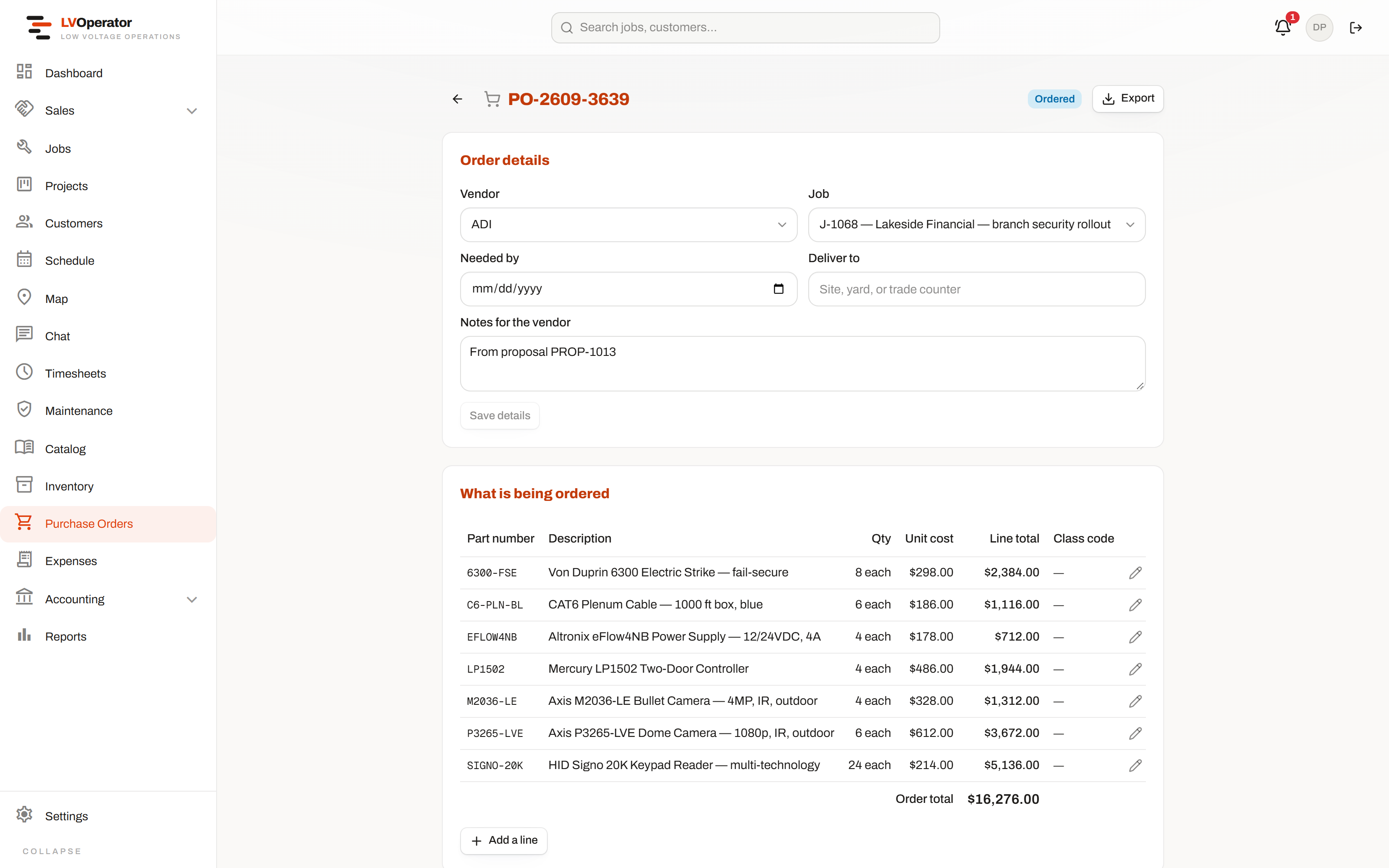
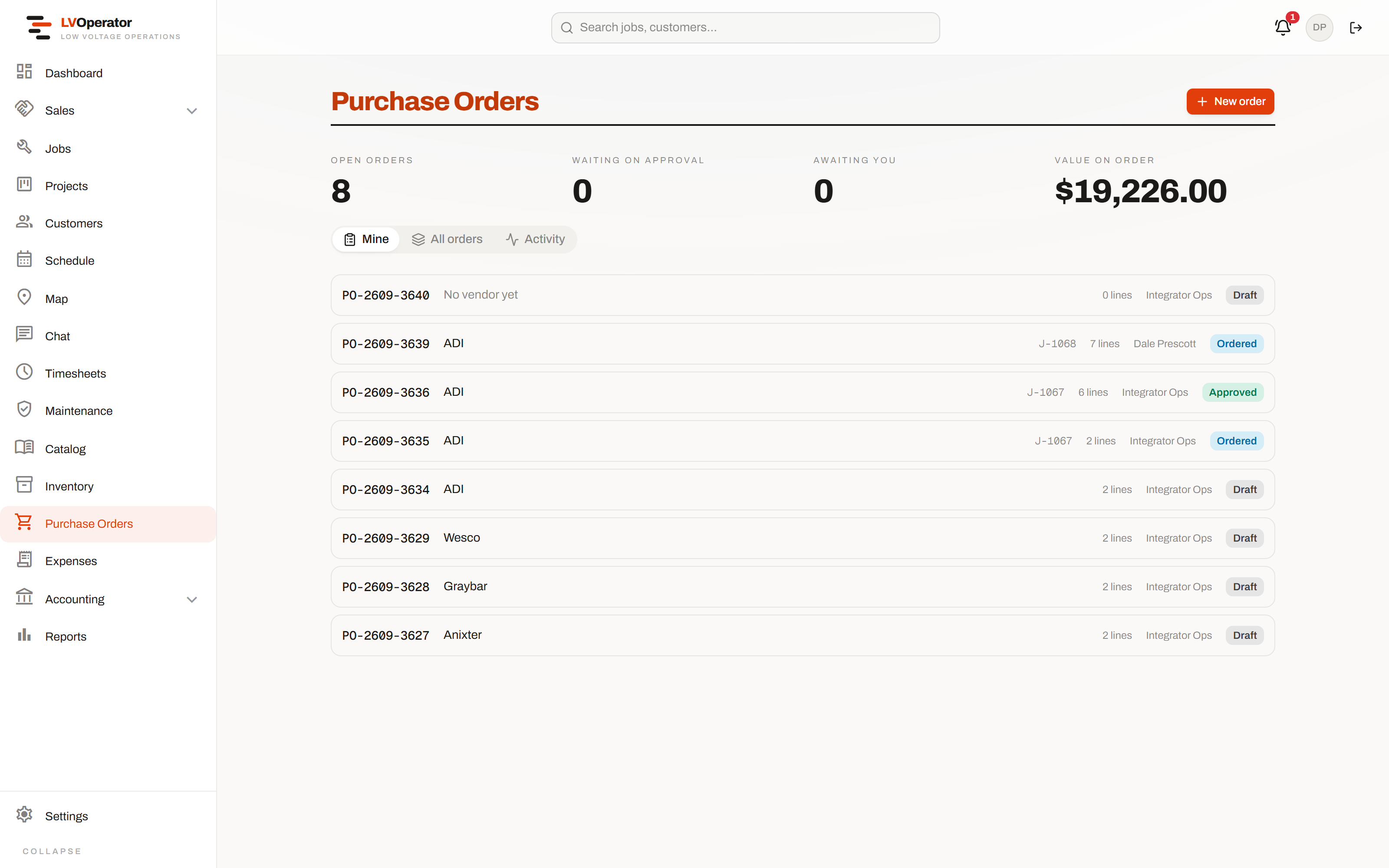
Everything on order, in one place.
Draft, submitted, approved, ordered, received — the whole book, filterable, so the question “what are we still waiting on?” takes a glance rather than a phone call.
- ✓Grouped by status, filterable by vendor, job and date
- ✓Shipment tracking visible from the list, not buried a click deep
- ✓Reorder from inventory in bulk and it splits itself into one PO per vendor
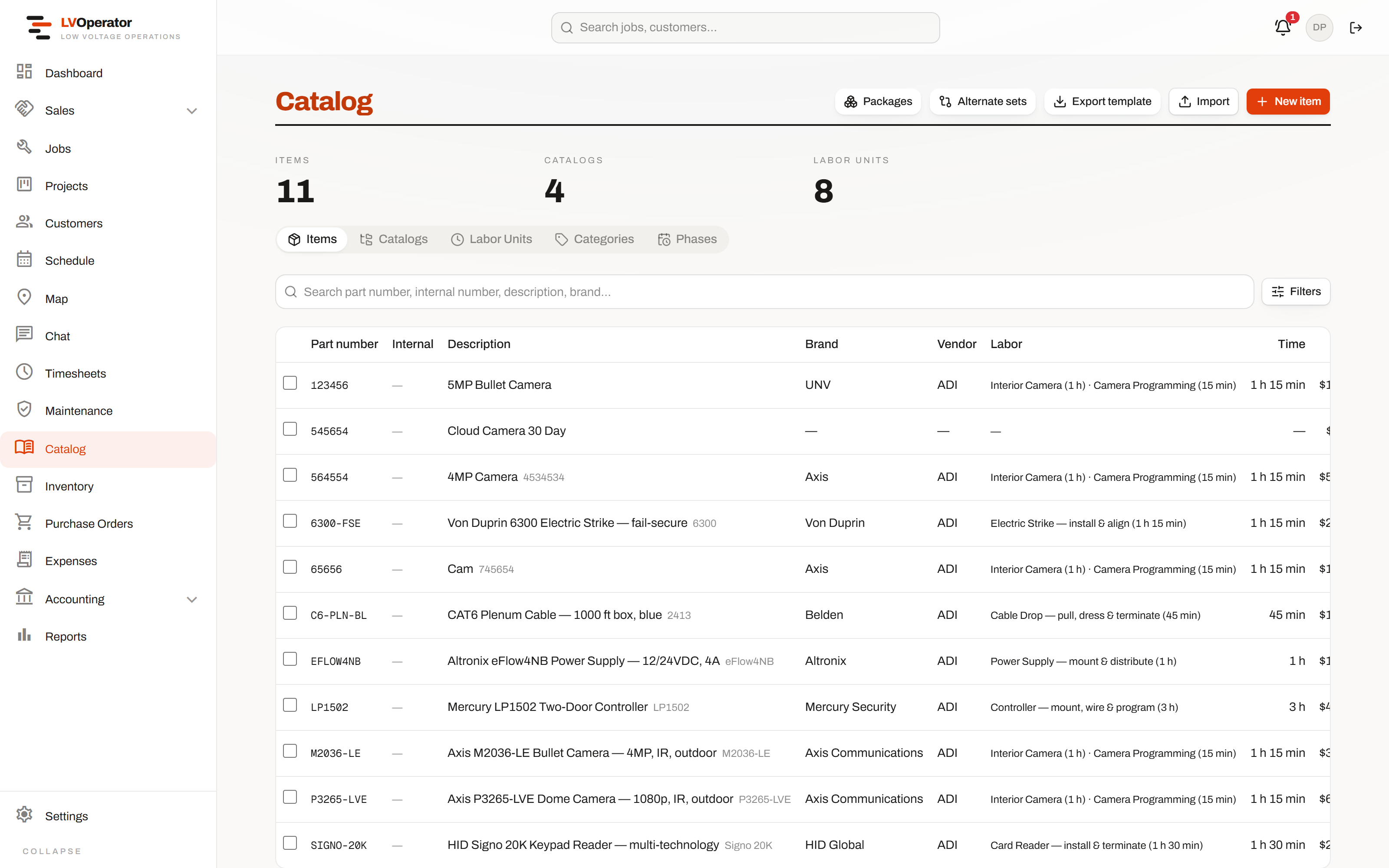
Priced once, used everywhere.
Parts, labor, packages and alternates in one catalog. Change a labor unit in its folder and every item that uses it corrects itself — including the estimates being built right now.
- ✓Commissioning checklists and required photo counts defined per category
- ✓Accessories that follow an item automatically, or get offered when it's added
- ✓Plan symbols attached to items, so a takeoff counts the thing you actually sell
- ✓An item can sit in several catalogs at once — by brand, by vendor, however you group
- ✓Bulk import and export to Excel, reported back row by row
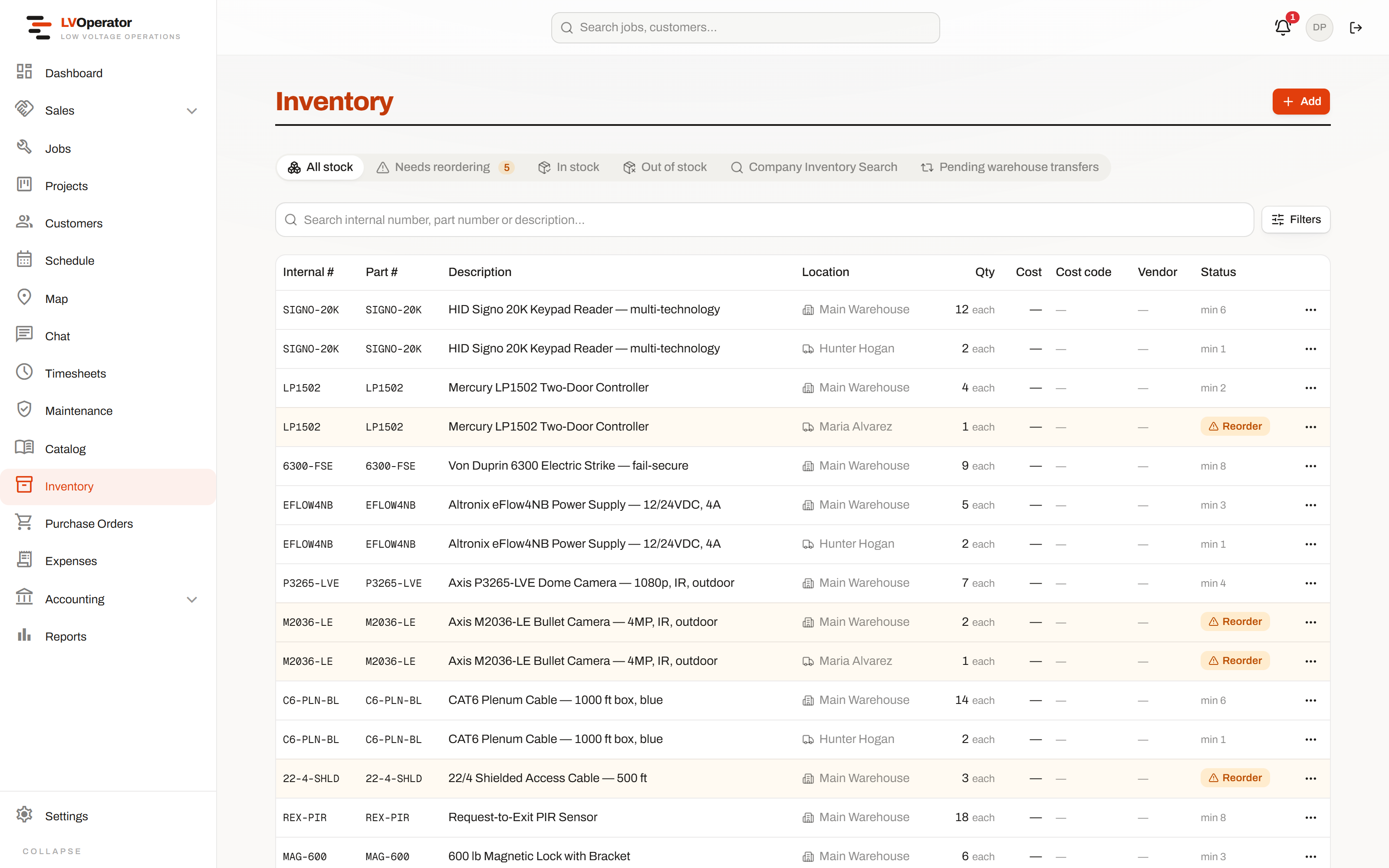
Every van and every warehouse, in one table.
Stock is held where it actually is — on a truck, in a warehouse, on a shelf — and a part fitted on a job comes out of the right one.
- ✓Reorder in bulk, split automatically into one purchase order per vendor
- ✓Technician-to-technician transfers, searchable by distance
- ✓Per-user control over exactly which vans or warehouses somebody may touch
- ✓Cost visible only to the roles that should see it, enforced at the database
Bill it, and know where you stand
A service call, a mid-size install and a four-hundred-thousand-dollar job with a bank inspector on it do not get billed the same way anywhere else in this trade — so they don't here either.
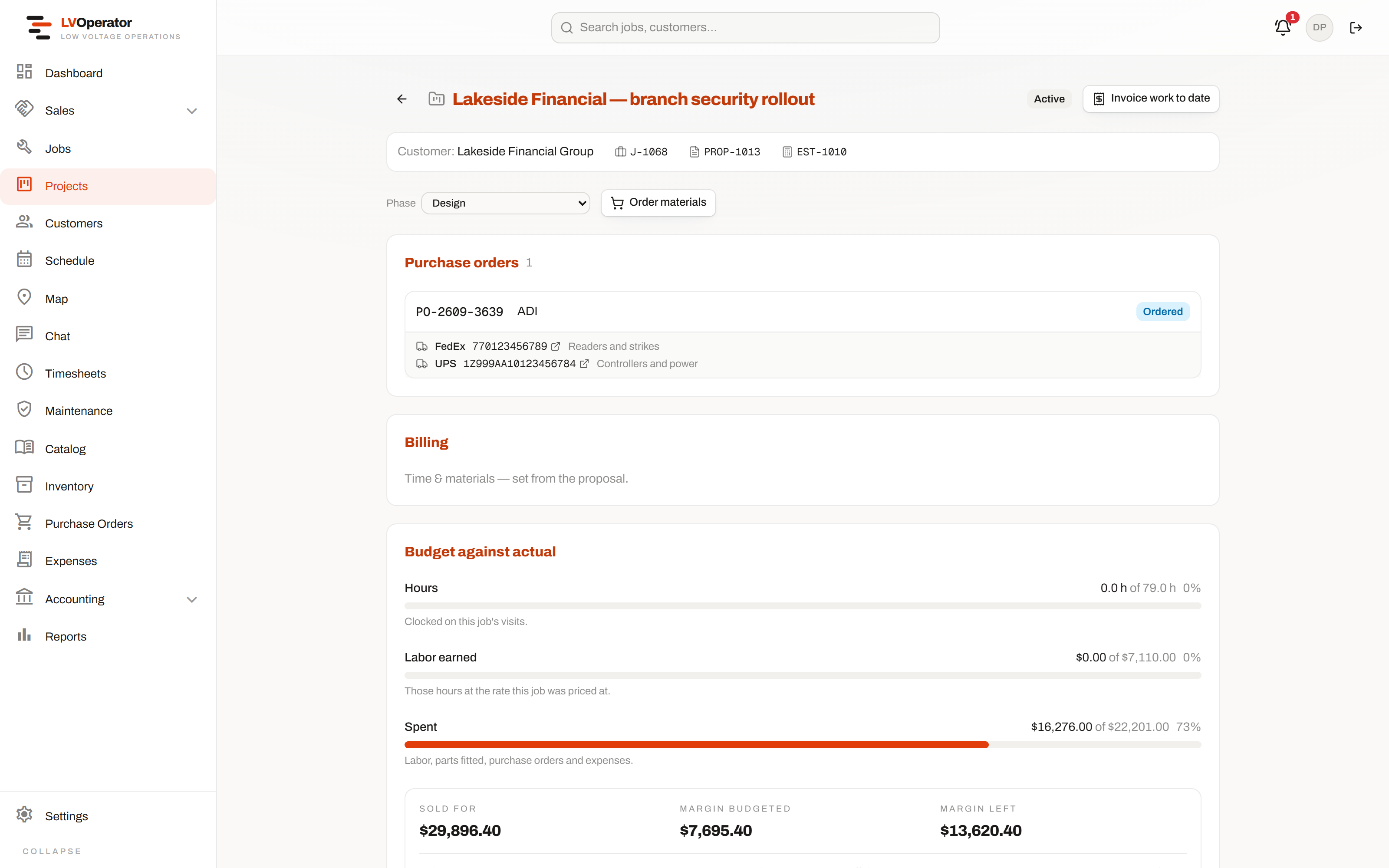
Budget against actual, while there's still time to do something.
A project measures itself against what it was sold for — hours clocked, parts fitted, purchase orders raised and expenses filed — continuously, not in a reconciliation three weeks after handover.
- ✓Labor earned against labor cost, so the margin gap is visible rather than inferred
- ✓Purchase orders and their shipments shown on the project that is paying for them
- ✓Time & materials, draw schedules, or full AIA G702/G703 with retainage tracked automatically
- ✓A line-by-line budget you can add to, for costs the estimate never knew about
- ✓Invoice work to date without leaving the page
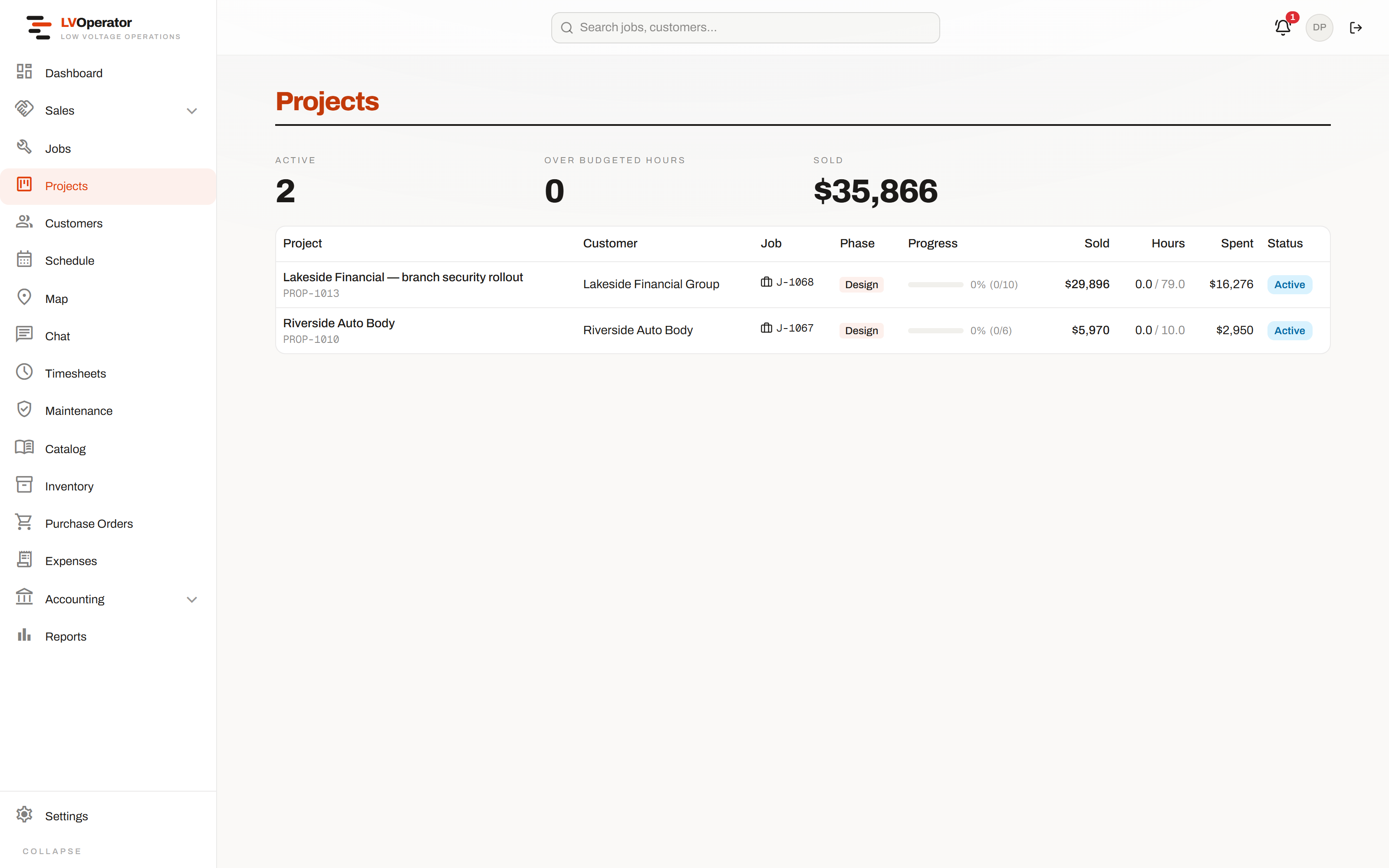
Every project, and whether it's still making money.
Phase, contract value and spend, across the whole book of work — so a project going wrong is something you notice rather than something you're told about.
- ✓Phase tracked per project, from design through to closeout
- ✓Contract value reflects the signed proposal plus every approved change order
- ✓Filter by customer, phase or date, with the filter in the URL
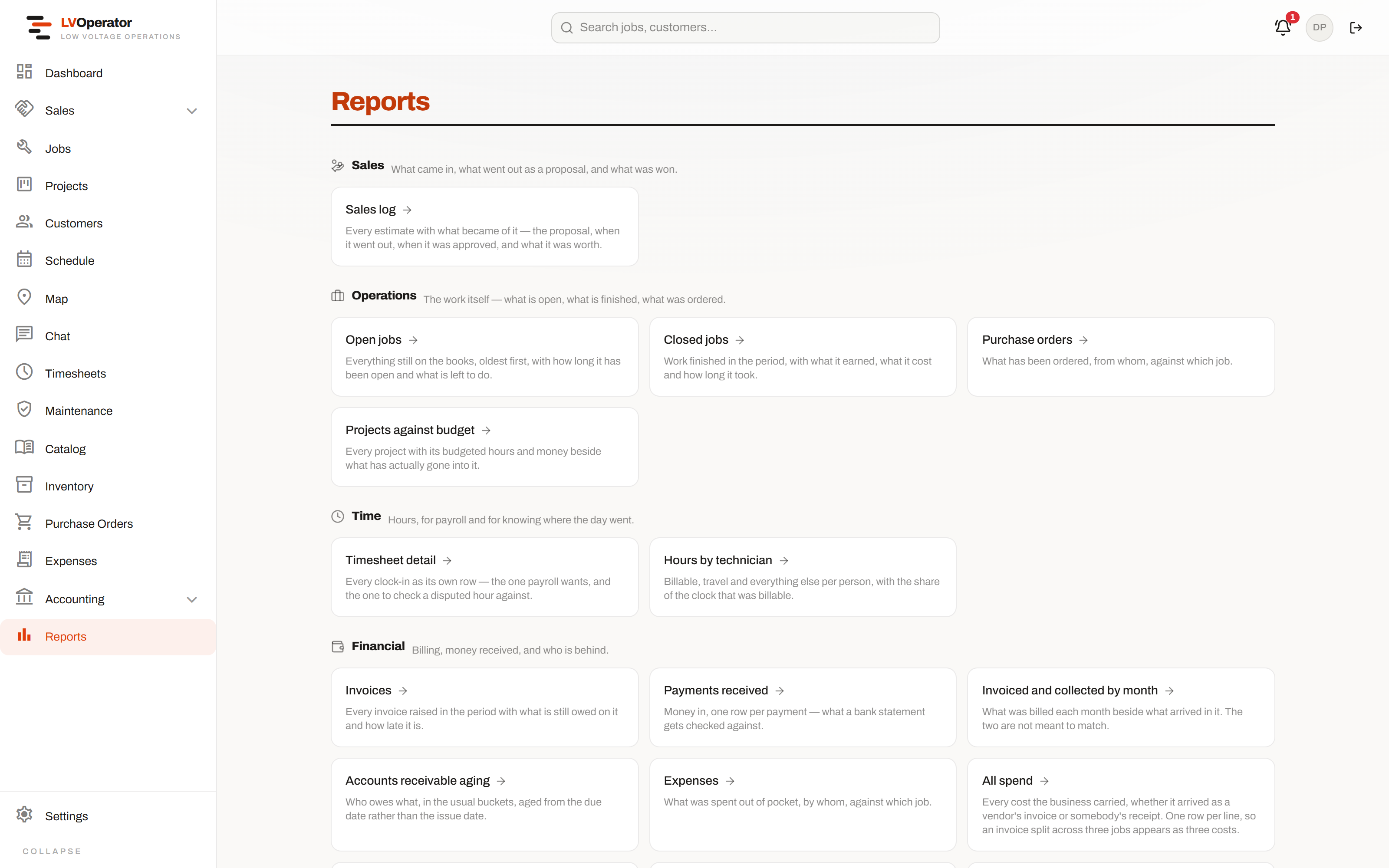
The numbers, exportable, and scoped to who's asking.
Sales funnel, job margin, timesheet detail, AR aging, profit & loss, work-in-progress. Cost and margin figures are not blurred or greyed for a role that shouldn't see them — they are absent.
- ✓Exports to Excel or CSV, not a screen you have to screenshot
- ✓Every report filtered to the branch, division or region the person belongs to
- ✓Work-in-progress and AR aging for the conversation with the bank
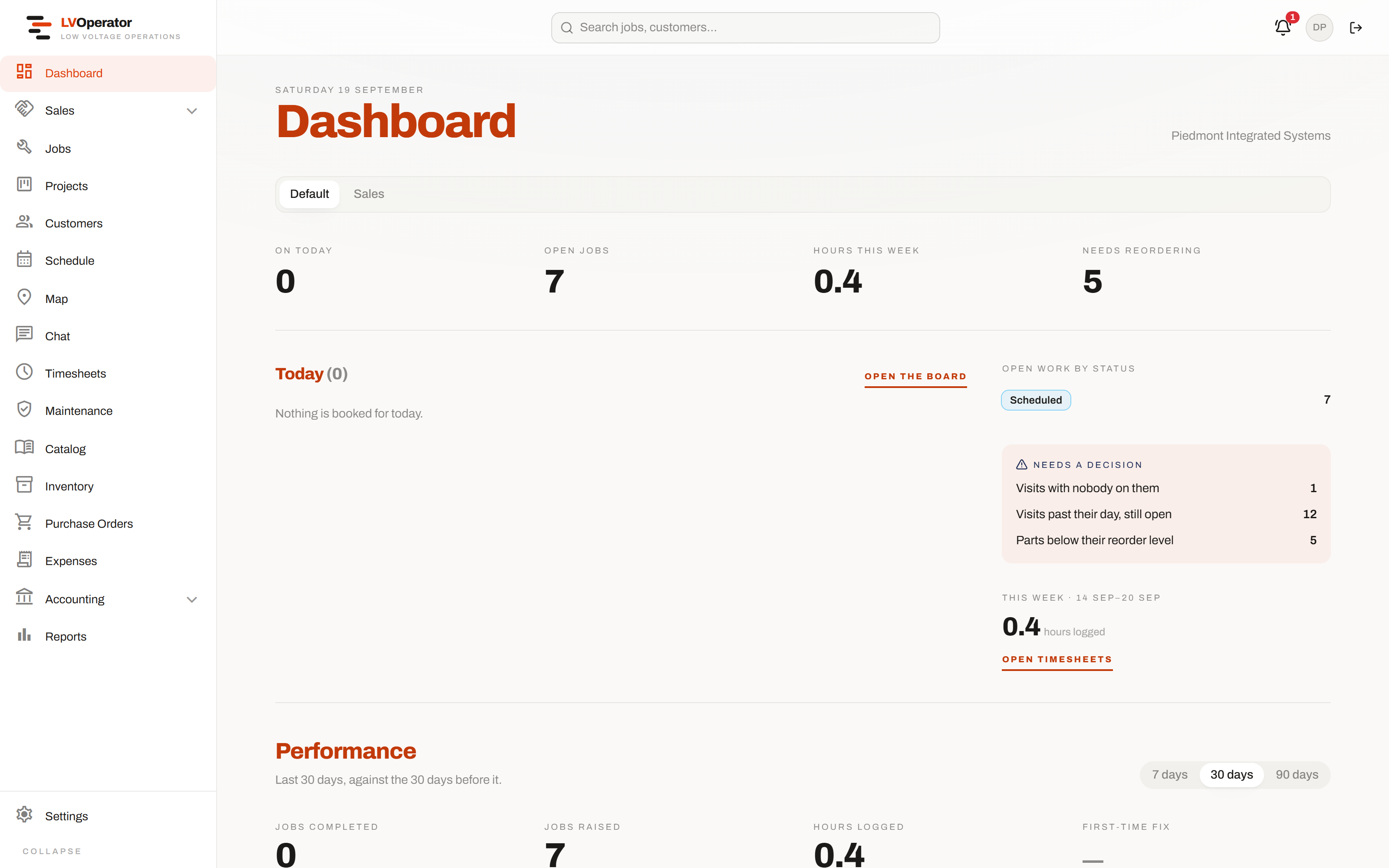
A home screen that tells you what needs deciding.
Not a wall of vanity metrics. Visits with nobody on them, visits past their day still open, parts below their reorder level — the things that will become a problem if nobody looks.
- ✓A dashboard per role: the scheduler, the owner and the bookkeeper each get their own
- ✓A no-code metric builder — pick the entity, the field, the filter
- ✓Performance measured against the period before it, so a number has a direction
- ✓The technician gets their own day instead: running clock, next job, open milestones
If it’s part of running the job, it’s already in here.
Every module, not a curated highlight reel. Twenty-one areas, built for this trade specifically rather than bolted on from a generic template.
CRM & pipeline
- Pipeline board or list view, same leads, toggle anytime
- Every filter and sort lives in the URL — bookmarkable, shareable
- Capture leads straight off your own website, with anti-spam built in
- Calls, emails, meetings and to-dos tracked as follow-ups with owners and due dates
- Convert a lead to a customer in one step, or mark it won against an existing account
- Create the site while you enter the lead — no dead end later when it's time to schedule
- Change orders and re-quotes raised straight from the opportunity that started them
Estimating
- Systems, alternates, packages and custom items, priced from your catalog automatically
- A location and a multiplier on a whole system — four identical branch offices, entered once
- Whole-estimate tax, shipping and permit percentages, defaulted and overridable
- Switch an estimate between Service and Project pricing and it reprices itself
- Bulk-tag, bulk-markup, bulk-duplicate or bulk-delete lines at once
- Regroup the same lines by System, Location, Phase or Category on demand
- Bill of Materials export to Excel or CSV, subtotaled and grouped
- Push straight to a job and project with no proposal, for verbal approvals
Plan takeoff
- Upload a PDF plan set, pick sheets, rotate and calibrate to a known dimension
- Count devices by clicking the plan, into the system and location they belong to
- Auto-detect: box one symbol and it finds the rest, each match reviewable before it counts
- A confidence threshold you control, so a near-miss is offered rather than silently counted
- Draw cable runs on the plan and get real measured lengths, not guesses
- Counts sync into the estimate live, and the estimate tells you when it is up to date
- Export marked-up plans with a numbered device schedule, or the counts as CSV
Proposals & signing
- Show or hide pricing, line items, or whole systems, per proposal
- E-signature drawn or typed on the customer's own phone, timestamped by the server
- Track when a proposal was actually opened, not just sent
- Withdraw it, edit the estimate underneath, and send the same proposal back out
- Choose the billing method — time & materials, draws, or AIA — at approval
- Change orders shown to the customer with the reason, itemized against the contract
- Admin-only activity log of every view, send and approval
E-Agreements
- Write your own clauses, or drop signature and initial fields onto an uploaded PDF
- Recurring price, term length and e-sign consent wording, set per template
- Custom priced items — flat, cost-plus-markup, or percent-of-install
- Multi-party signing order — a countersigner only sees it once the customer has signed
- A signed agreement can start a maintenance plan and a recurring subscription on its own
- Full audit trail — opened, signed, by whom, from where
Customers & sites
- Account and per-site contacts, tagged, with a primary flag
- Portal access invitations by link — no email provider required
- Lightweight balance tracking separate from the real invoice ledger
- Every job, invoice, contact and document merged into one activity feed
- Per-site equipment register with warranty tracking
- Full sales and job history kept per site, including withdrawn and void records
- Org-configurable custom fields, with an office-only visibility flag
Purchase orders
- Route approval to specific named people, not a blanket queue
- Choose whether one approval is enough or every approver has to sign off
- Approvers get notified the moment a PO is waiting on them
- Pick the parts that go on it — nothing is raised blind
- Auto-raised from an approved proposal, merged one line per vendor
- Attached to the job or project it belongs to, or flagged as overhead instead
- Tracking numbers per shipment, carrier detected from the number itself
- An activity log at the foot of every PO — raised, routed, approved, ordered, received
- Cost columns present only for roles allowed to see them
Expenses
- Receipt photos captured straight from the phone's camera
- Approved by someone who isn't the person who filed the claim
- Optional job link, or left blank for a cost that isn't job-specific
- Sent back with a required reason instead of a silent rejection
Maintenance plans
- Block hours, included visits, or a parts budget — pick the shape that fits
- Usage tracked live against the entitlement, not reconciled at renewal
- Recurring visits generated on a schedule, or forced on demand
- Can originate from a proposal, an e-agreement, or be set up directly on a site
Billing & invoicing
- Draw schedules and full AIA G702/G703 applications, with retainage tracked automatically
- Every project measured against its sold budget — hours, parts, POs and expenses, live
- Real invoice ledger — partial payments tracked individually, never a blind balance overwrite
- Recurring and subscription billing, auto-drafted on schedule with a human still pressing send
- Stripe or QuickBooks connected for card payments, or neither if you'd rather take a check
- Public, no-login invoice and change-order links your customer can actually open and pay
Customer portal
- Branded to you, not to the platform — your customer never sees our name
- Outstanding balance, invoices, and work history in one place
- Book a service call that lands straight on your dispatch board
- A persistent message thread with the office, kept apart from internal chat
Catalog
- One catalog for parts, labor, packages and alternate sets — priced once, used everywhere
- Commissioning checklists and required photo counts, defined per category
- Accessories that follow an item automatically, or get offered when it's added
- An item can belong to several catalogs — brand, vendor, whatever you group by
- Labor units organized into folders, correcting one corrects every item that uses it
- Plan symbols attached to catalog items, so a takeoff counts the thing you actually sell
- Bulk import and export to Excel, with row-by-row reporting on what changed
Jobs & the field
- Devices tracked pending → installed → tested → commissioned, with required photos enforced before close
- Procurement status and tracking numbers, with the carrier detected automatically
- A deficiency found on site becomes a real CRM opportunity, not a note to remember
- Parts pulled from a technician's own van, or fitted on their behalf and still credited correctly
- Photos and notes split office and technician, private by default, shared one at a time
- Customer sign-off captured on a canvas, closeout PDF generated from what was actually installed
- Recurring jobs regenerate on a schedule, each one its own real record
Dispatch, map & scheduling
- Drag-and-drop board that warns on double-booking instead of silently allowing it
- A live map of every technician and warehouse, with GPS staleness shown honestly
- Week and month views for the bigger picture
- Time clock with a GPS fix on every punch, and a separate travel clock where it applies
The technician's phone
- One focused screen: the job in front of them, the gate code, the site contact, one tap to call
- Close-out blockers — open tasks, missing photos, no signature — surfaced before a job can close
- Queues notes, clock times and task changes on the device and syncs the moment signal returns
- Its own chat and task list, without ever seeing what the office sees
Timesheets
- Weekly grid per technician, hours split by class code and travel automatically
- Approve a week to lock it — editing after automatically reopens it
- Export approved weeks to Excel or a printable sheet
Inventory
- Every van and warehouse in one searchable table, cost visible only to the roles who should see it
- Reorder in bulk, automatically split into one purchase order per vendor
- Technician-to-technician stock transfers, searchable by distance
- Per-user control over exactly which vans or warehouses someone may touch
Team chat
- Direct, group, or job-scoped conversations for the office and the field
- Customer messaging kept in its own thread — nothing internal ever leaks across
- Unread counts everywhere a conversation shows up
Reports
- Sales funnel, job margin, timesheet detail, AR aging, profit & loss, work-in-progress
- Cost and margin figures simply absent for a role that shouldn't see them
- Exportable to Excel or CSV, not just a screen you have to screenshot
Dashboards & home
- A dashboard built per role — the scheduler, the owner and the bookkeeper each see their own numbers
- A no-code metric builder — pick the entity, the field, the filter
- The technician's own day — running clock, next job, open milestones — as their landing screen
Admin, permissions & scale
- Roles built from individual capability flags, not a fixed tier
- Every module, job and record scoped to who's allowed to see it, enforced at the database
- Branches, divisions and regions for more than one crew out of more than one office
- Your branding, invoice and proposal appearance, tax rates and document numbering, all yours to set
- Push notifications for assignments, messages and approvals — never for the action you already took
Thirty minutes, your jobs, an honest answer.
Bring one real quote — ideally one that went sideways. We price it live against your catalog, take it through to a signed proposal and out to a dispatched job, and tell you if it is a bad fit.